Busch Microtronic 2090 and Kosmos CP1 in MAME
Both are also on the software projects page.
MAME already had drivers for two German educational computers of the 1980s: the Busch Microtronic 2090 (by hap) and the Kosmos CP1 (by Sandro Ronco, until now marked "not working"). Both run the original firmware ROMs. I have extended them:
- Busch Microtronic 2090 (
mt2090): programs can be loaded as.MICfiles, and the digit 9 now shows its bottom segment as on the real machine. - Kosmos CP1 (
cp1): the CP1 is now fully usable and marked working. It has the I/O module (Port 1 switches, Port 2 LEDs), the manual's random-number wiring, Port 3 of the CP3 memory expansion, a clickable layout of the whole console, and.cp1program files can be loaded.
Both changes are submitted to MAME as pull requests: Microtronic, #16964 and Kosmos CP1, #16967. Once they are merged, they will be part of the regular MAME releases, with nothing to build. Until then, you can build them yourself from my MAME fork, as described below.
The CP1 driver was checked instruction by instruction against my Kosmos CP1 browser emulator: about 12.6 million instructions in six test scenarios, with the same results.
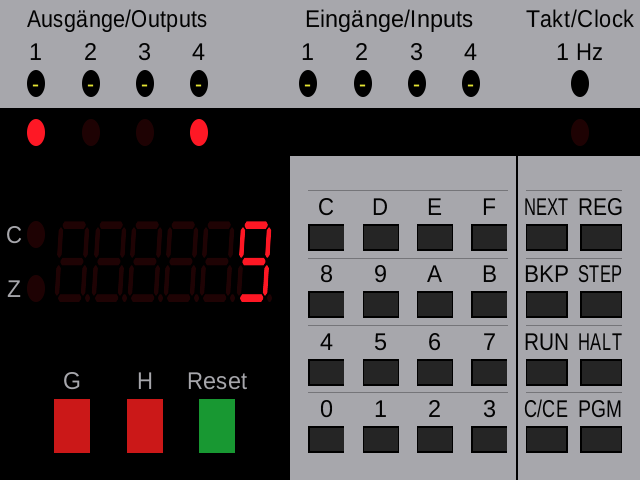
The Busch Microtronic 2090 in MAME, counting: the display shows 9, the output LEDs 1 and 4 show it in binary
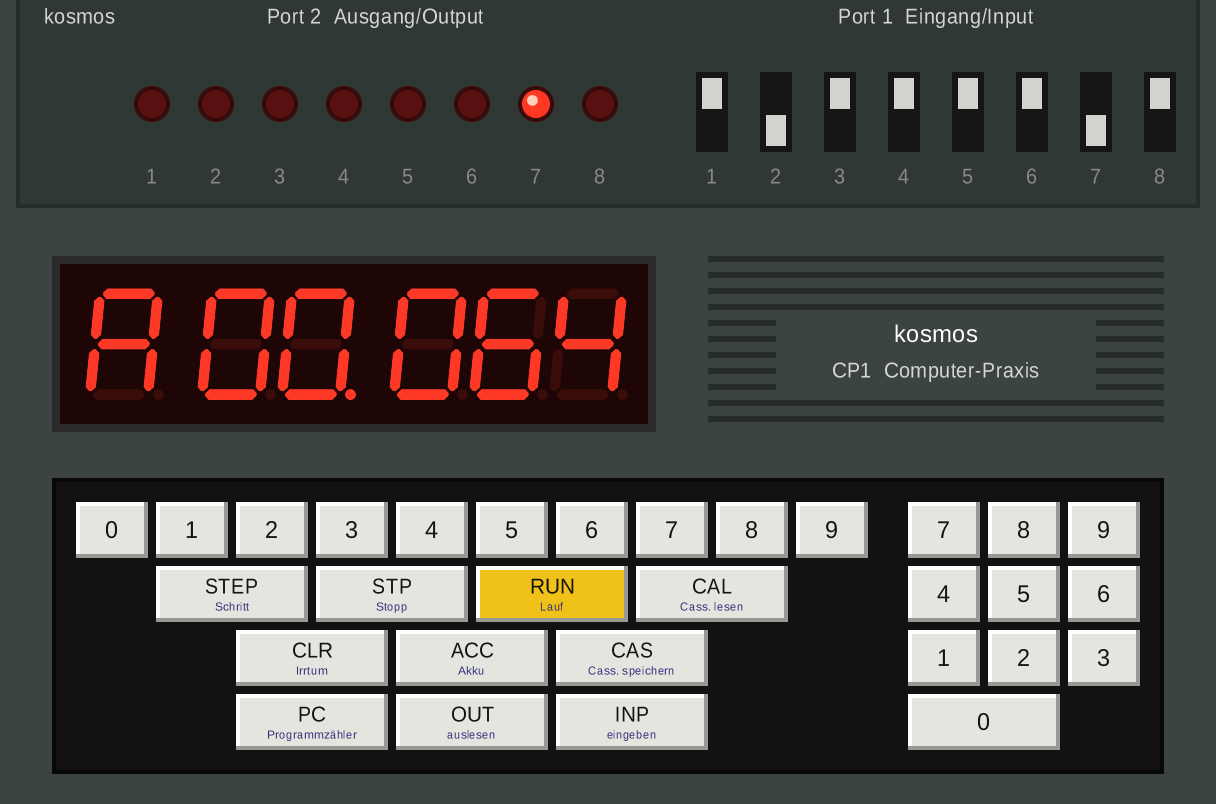
The Kosmos CP1 in MAME with its I/O module: a running light on the Port 2 LEDs, switches 2 and 7 down
Building
Each machine is on its own branch of my fork, lambdamikel/mame: mt2090-quickload for the Microtronic and kosmos-cp1 for the CP1. The commands below build a small MAME for each machine instead of the whole of MAME. The first build compiles MAME's core and takes a while; the second machine reuses it and is quick.
Linux (Debian, Ubuntu, Raspberry Pi OS)
Install the build tools and libraries:
sudo apt-get install git build-essential python3 libsdl2-dev libsdl2-ttf-dev libfontconfig-dev libpulse-devGet the source and build the Kosmos CP1 (this gives the program ./cp1):
git clone --depth 1 -b kosmos-cp1 https://github.com/lambdamikel/mame.git
cd mame
make -j$(nproc) USE_QTDEBUG=0 SUBTARGET=cp1 SOURCES=src/mame/skeleton/cp1.cpp
Then the Microtronic, in the same folder (this gives ./mt2090):
git fetch --depth 1 origin mt2090-quickload
git checkout FETCH_HEAD
make -j$(nproc) USE_QTDEBUG=0 SUBTARGET=mt2090 SOURCES=src/mame/handheld/hh_tms1k.cpp
USE_QTDEBUG=0 leaves out MAME's Qt debugger, so Qt doesn't need to be installed.
Windows and macOS
MAME builds there too, with more setup: see Compiling MAME in the MAME documentation. Get the source as above, and use the same make commands with their SUBTARGET and SOURCES settings.
ROMs
As with every machine in MAME, the firmware ROMs are not included. Put them in a folder roms next to the program, or point MAME to them with -rompath:
| Machine | Folder or zip | File | CRC |
|---|---|---|---|
| Microtronic | roms/mt2090/ |
tms1600nll7574 |
dcd56aa0 |
| Kosmos CP1, mask ROM | roms/cp1/ |
cp1-kosmos-b.rom |
fea8a2b2 |
| Kosmos CP1, EPROM version | roms/cp1/ |
cp1-2716.bin |
3a2caf0e |
For the Microtronic, MAME warns that two PLA dumps are missing and that the machine "might not run correctly". That is expected; it runs fine.
Running
./mt2090 mt2090 -window
./cp1 cp1 -window
If you have the CP1's EPROM version (cp1-2716.bin), add -bios 2716. Adding -confirm_quit makes MAME ask before Esc closes it.
The keypads are drawn on screen and can be clicked with the mouse, or used from the PC keyboard (see below). Tab opens MAME's menu. Input Assignments (this System) lists every key, and Machine Configuration holds the machine's options. F3 resets the machine.
Loading programs
Programs are plain-text files. Load one with Tab → File Manager → quickload, or on the command line with -quik <file>.
- Microtronic:
.MICfiles, the program format of the Microtronic emulators since Ingo D. Rullhusen's micsim (2005). Start a program withHALT,NEXT,0,0,RUN. Programs: the Busch 2090 software archive, the PicoRAM 2090 programs, and the libraries of the browser emulator and the MiSTer core. - Kosmos CP1:
.cp1files. Load them once the display showsP 000, because the firmware clears the memory when it starts. Then type the start address and pressPC,RUN. Most of the manual's listings start at001, the guide's examples at000, and each file says where to start in its first lines. 63 programs, from the Kosmos manual and from my programmer's guide, come with the MiSTer core.
Keys: Busch Microtronic 2090
| Microtronic | PC key |
|---|---|
0–F |
0–9, A–F (digits also on the number pad) |
HALT, NEXT, RUN |
H, N, R |
PGM, STEP, REG, BKP |
P, S, G, K |
C/CE |
Delete or Backspace |
| Buttons G, H | Left Ctrl, Left Alt |
| Reset | F1 |
Machine Configuration connects each of the four outputs to a piezo buzzer, and each of the four inputs to a fixed level, button G or H, one of the outputs, or the 1 Hz clock.
Keys: Kosmos CP1
| Kosmos CP1 | PC key |
|---|---|
0–9 |
0–9 (main row) |
INP, OUT |
I or Enter, O |
PC, ACC |
P or C, A |
RUN, STP, STEP |
R, H or B, S |
CLR |
Delete or Backspace |
CAL, CAS |
L, K |
| Port 1 switches 1–8 | number pad 1–8, or click them |
Machine Configuration has three options:
- CP3 RAM Expansion: program cells 128–255 and Ports 3–5. The Towers of Hanoi needs it. The firmware looks for the CP3 when it starts, so press
F3after switching it on. - Port 2 Wired to Port 1 (Random Numbers): the manual's wiring for its random-number programs. Put all Port 1 switches up while using it, since a switch that is down holds its line low.
- CP2 Cassette Interface:
CASandCALsave and load through MAME's cassette, a WAV file (Tab→ Tape Control). It uses Port 1 line 8, so switch 8 has no effect while it is on.
Credits
The mt2090 driver is by hap, the cp1 driver by Sandro Ronco. The extensions are by Michael Wessel, made with Claude Code (Claude Opus 5.5).